Tutorial
How to Reconcile Transfers Between Bank Accounts With AI
This tutorial demonstrates the workflow on the synthetic starter toolkit only. Every screenshot uses demo data.
Internal transfers are easy to miscount as income or spending. This workflow pairs an outflow on one account with an inflow on another, then keeps those legs out of income and expense totals.
âWith AIâ here means a bot that applies deterministic matching rules you can test. It does not invent a match from a vague description, and it does not write âTransferâ back into Tiller for you.
Download the starter workbook or the full toolkit zip to follow along.
The matching rules
- Candidate legs must be on different accounts.
- Absolute amounts must agree within the tolerance (default $0.01).
- Posting dates must fall within the window (default 5 days).
- Confirmed if the descriptions corroborate each other (for example âTransfer to Savings Demoâ / âTransfer from Checking Demoâ) or they share a reference or check token (the demo uses
ref:ZX9Q12AB). - Probable if the amounts and dates line up uniquely, but the descriptions do not corroborate.
- If several counterparties could complete the same amount in the same window, do not auto-pair them. Send the set to manual review.
- Unmatched lists only include legs whose descriptions look like transfers (
transfer,xfer,tfr, orwire). A sheet that categorizes almost everything as âTransferâ would otherwise dump the entire register into the unmatched list. - Matched internal transfers, and unmatched description-based transfer legs, are excluded from income and expense totals.
These rules use the usual Tiller Transactions columns: Date, Description, Category, Amount (signed), Account, Account ID, and Transaction ID. A separate Transfers tab, if your workbook has one, is not required; reconciliation runs on the Transactions register.
The demo transfers
The synthetic Transactions tab includes:
- A $500.00 checking â savings pair, confirmed by description.
- A $200.00 wire pair, confirmed by a shared reference.
- A $75.00 debit-card send / incoming ACH, probable (unique amount, weak descriptions).
- A $60.00 outflow to âExternal Demoâ with no counterpart inflow of $60.00 â unmatched withdrawal.
- A $90.00 inflow from âExternal Demoâ â unmatched deposit.
- A $100.00 âsplit transferâ outflow with two $100.00 inflows â manual review, not an automatic pair.
Prompt tested on this data
Run on November 10, 2026 against the same starter toolkit:
Match outflows on one account to inflows on a different account when the absolute amounts agree within $0.01 and the posting dates are within 5 days. Mark a pair confirmed when the descriptions or a shared reference or check token corroborate the match; otherwise mark it probable if it is a unique candidate. List unmatched transfer withdrawals, unmatched transfer deposits, and anything that needs manual review because several counterparties share the same amount and window. Exclude internal transfers from income and expense totals. Do not write to the spreadsheet. Do not include account numbers.
Tested result (demo): 3 confirmed pairs, 1 probable pair, 1 unmatched withdrawal, 2 unmatched deposits, manual review on the ambiguous $100.00 split, 11 internal-transfer legs excluded from totals. Income excluding internal transfers: $6,414.25. Expense excluding internal transfers: $94.50.
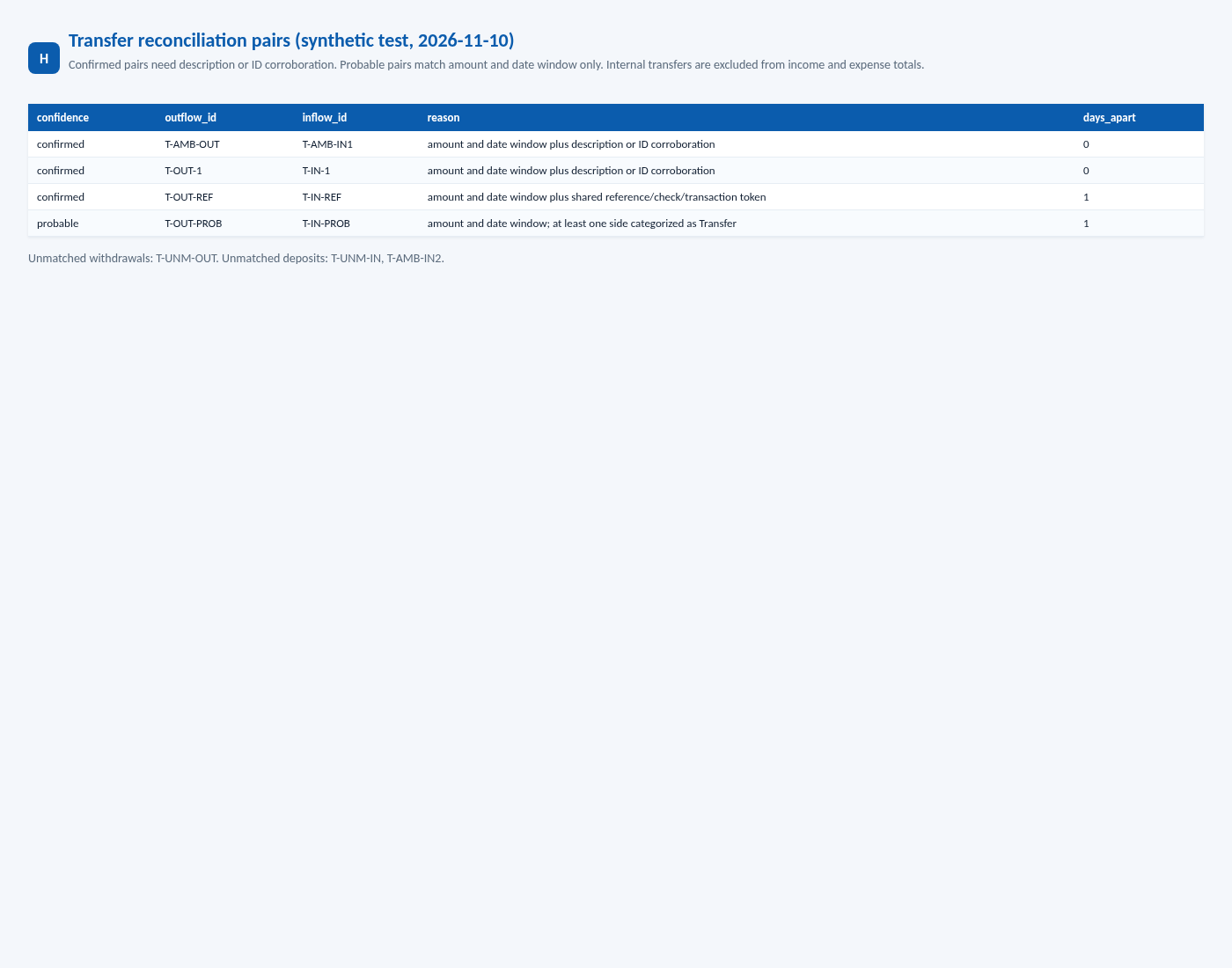
Those counts are also asserted in the transfer reconciliation tests. The full 12-test suite (deposits + transfers) was re-run on November 10, 2026 at 11:13 AM America/Denver (MST) and passed 12 / 0 on synthetic fixtures only.
How to read the output
- Confirmed pairs are the ones you can usually file away.
- Probable pairs are worth a 10-second look â unique math, weak wording.
- Manual review is where one outflow could fit more than one inflow. Do not let the tool guess.
- Unmatched withdrawals that say âwireâ or âtransferâ and never show up on the other account are the items to chase.
- After exclusions, income should no longer include the $500.00 that simply moved from checking to savings.
Using this with your own Tiller spreadsheet
If you later run this against a private export of your own workbook, keep that file and the report private. Do not publish pair examples that contain real descriptions, amounts, or account numbers. HowItCodes tutorials, screenshots, and test results use synthetic demo data only. The first pass on a large register is for tuning the window and the transfer-word list, not for publishing screenshots.
Return to the starter toolkit or the deposit-tracking tutorial.